Easy to Use, Integrated Technology
An intuitive interface that is quick to learn, with design, analysis, data management and manufacturing tools working together in one ecosystem.

3D CAD Software · Authorized Reseller
Explore the Standard, Professional and Premium packages, the connected SOLIDWORKS products and term licensing options. Along with your licenses, MAGEN provides installation, training and technical support.
An intuitive interface that is quick to learn, with design, analysis, data management and manufacturing tools working together in one ecosystem.
Used widely across industry and education, so experienced users, training content and examples are easy to find.
From choosing the right package to installation, training and day-to-day technical questions, the MAGEN team is there for you.
Term Licensing and Subscription
Start using SOLIDWORKS on an annual term license without a large upfront investment, and add licenses for busy project periods when you need them.
We will compare perpetual, subscription and term options with you based on your team size and budget plan.

Why SOLIDWORKS?
Developed by Dassault Systèmes, SOLIDWORKS is 3D CAD software that covers design, engineering and manufacturing from end to end. Its user-friendly interface, broad ecosystem of connected products, technology that improves with every release and large user community help teams work more productively.
Parametric, feature-based modeling and intuitive tools turn your ideas into 3D models quickly, and even complex parts and large assemblies stay manageable.
Bring design, assemblies, drawings, simulation and data management together in one ecosystem, so you move from step to step without recreating data and with fewer transfer errors.
Every SOLIDWORKS release adds new tools and performance improvements; with a subscription you work on the latest version and stay in line with industry standards.
With SOLIDWORKS PDM and the 3DEXPERIENCE platform, every team works from the same up-to-date data, version confusion disappears and everyone gets to the right information instantly.
Test your products with SOLIDWORKS Simulation and other analysis tools before production, and save time, material and cost by building fewer prototypes.
Industry Solutions

On projects that demand high accuracy and traceability, validate designs with Simulation and manage data securely with PDM.
Learn more →
Manage multi-part machine assemblies, sheet metal and weldments in a single model, and derive order-specific machines with configurations.
Learn more →
Furniture design, cut lists and CNC output with SWOOD inside SOLIDWORKS, plus 3D configuration and quoting with MAGEN Planner.
Learn more →
Create CNC programs directly from the design model with SolidCAM, which runs inside SOLIDWORKS; design changes carry through to the toolpaths.
Learn more →Connected Products
An integrated solution for every need: from data management to analysis and from technical documentation to electrical design, SOLIDWORKS products work together on the same model.

Click the image to watch the product family video on the official SOLIDWORKS YouTube channel.

Manage design data securely in a single vault, with version and revision control, approval workflows and smooth collaboration between teams.
Learn more →
Combine project and process management, task tracking and document control on one platform built on PDM, and simplify complex workflows.
Learn more →
A professional 2D CAD solution for DWG/DXF files, with a familiar interface and smooth interoperability with SOLIDWORKS to speed up your drafting.
Learn more →
Run stress, deformation, vibration and thermal analyses without physical prototypes, and build durable, reliable products.
Learn more →
Create technical illustrations, assembly instructions and animations from 3D CAD data, and communicate clearly with production, sales and service teams.
Learn more →
Analyze fluid flow and heat transfer inside SOLIDWORKS, and simulate real operating conditions to improve design performance.
Learn more →
Present your 3D models with photorealistic images and animations before production, and create marketing and sales content quickly.
Learn more →
Analyze filling, cooling and warpage in plastic part and mold design, and catch molding defects before production.
Learn more →
Define dimensions, tolerances and manufacturing information directly on the 3D model, rely less on 2D drawings and digitalize your processes.
Learn more →
Manage electrical schematics, wiring and 3D cabinet design together, so electrical and mechanical teams work from the same data.
Learn more →
Generate ballooned inspection drawings and measurement reports automatically, and speed up quality control documentation.
Learn more →Production Process
With separate tools, design steps wait on each other and data is recreated at every handoff. With connected SOLIDWORKS products, mechanical and electrical design, design validation and technical communication run in parallel on the same data, and project and data management covers the whole process.

Pre-project and concepts → Mechanical design → Electrical design → Design validation → Technical communication → Quality and production

Pre-project and concepts → Mechanical design, electrical design, design validation and technical communication in parallel → Quality and production, with project and data management throughout. Result: shorter R&D cycles, lower costs, higher quality.
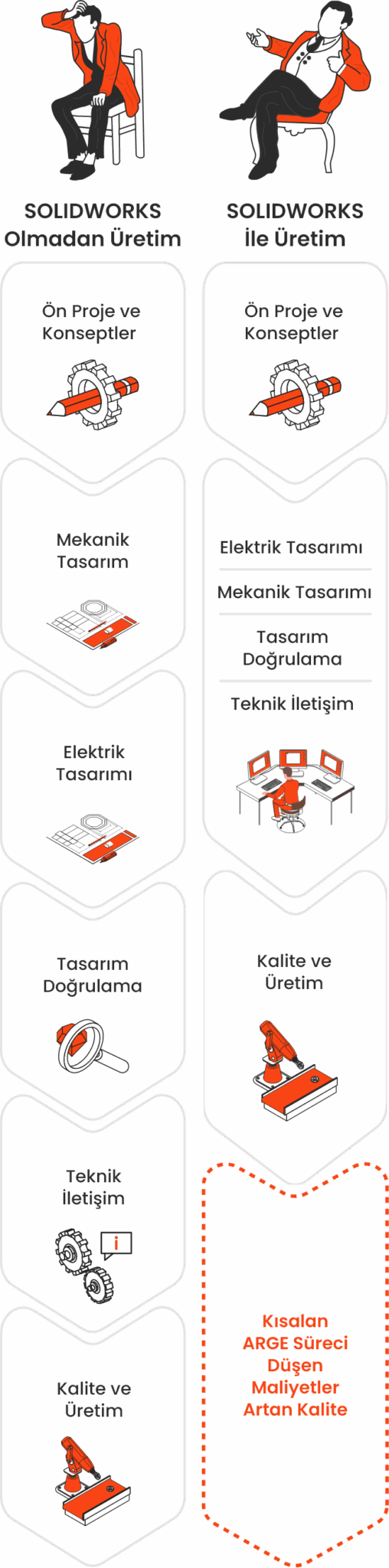
Without SOLIDWORKS, each step waits for the previous one. With SOLIDWORKS, mechanical design, electrical design, design validation and technical communication run in parallel, with project and data management throughout: shorter R&D cycles, lower costs, higher quality.
Let’s review your workflow and needs together.
Request a ConsultationPackages
All three packages share the same foundation, and each higher package includes everything in the one below. Let’s find the package that fits your workflow.


SOLIDWORKS Standard gives you powerful tools for creating parts, assemblies and 2D drawings quickly, and covers all your core design needs with sheet metal, weldment, surfacing and mold tools.


SOLIDWORKS Professional includes everything in Standard and takes you further with data management, photorealistic rendering, a standard parts library and automated cost estimation.


SOLIDWORKS Premium is the most complete SOLIDWORKS package, adding powerful analysis, design validation and advanced piping and cabling tools to everything in Professional.
| Package Features | SOLIDWORKS StandardSTD | SOLIDWORKS ProfessionalPRO | SOLIDWORKS PremiumPRE |
|---|---|---|---|
| Part modeling | Included | Included | Included |
| Assembly modeling | Included | Included | Included |
| 2D drawings | Included | Included | Included |
| SOLIDWORKS Toolbox (standard parts library) | Not included | Included | Included |
| SOLIDWORKS Simulation (linear static analysis) | Not included | Not included | Included |
| Motion (kinematic) analysis | Not included | Not included | Included |
| Surface modeling | Included | Included | Included |
| Sheet metal modeling | Included | Included | Included |
| Weldments (structural members) | Included | Included | Included |
| Mold design tools | Included | Included | Included |
| Draft and undercut analysis | Included | Included | Included |
| Feature and part library (Design Library) | Included | Included | Included |
| Bills of materials and cut lists | Included | Included | Included |
| Automatic hole and weld tables | Included | Included | Included |
| Interference and clearance detection | Included | Included | Included |
| Part cost estimation (Costing) | Not included | Included | Included |
| Tolerance stack-up analysis for parts and assemblies (TolAnalyst) | Not included | Included | Included |
| Product data management (PDM Standard) | Not included | Included | Included |
| Automated task scheduling (Task Scheduler) | Not included | Included | Included |
| Photorealistic rendering | Not included | Included | Included |
| Assembly cost estimation | Not included | Not included | Included |
| Pipe, tube and cable routing (Routing) | Not included | Not included | Included |
| Advanced surface flattening | Not included | Not included | Included |
Package contents may vary between SOLIDWORKS releases; contact us for the current details. For more, see the SOLIDWORKS 3D CAD page.
Community and Support
SOLIDWORKS is widely taught at universities and technical schools, which makes it easier to find engineers and designers and get them up to speed.
Official SOLIDWORKS certifications such as CSWA, CSWP and CSWE make skills measurable, and structured training helps your team grow step by step.
Built-in tutorials, extensive help documentation and a knowledge base for subscription customers make it easy for users to stay current.
SOLIDWORKS user groups (SWUGs) and forums around the world offer a rich place to share experience and collaborate with industry professionals.
With MAGEN’s SOLIDWORKS training, delivered in Turkish, and video tutorials, your users progress from the basics to advanced skills.
Pick up everyday tips from online SOLIDWORKS communities, and reach the MAGEN technical team with installation, licensing and usage questions.
Licensing and Training Options


Learn about the conditions of the SOLIDWORKS licensing program for new startups.
Learn More
The SOLIDWORKS education edition for universities, vocational schools and training centers.
Learn More
Keep your SOLIDWORKS investment current with new releases, technical support and knowledge base access.
Learn More
Hands-on SOLIDWORKS training, from the basics to advanced topics, to get your team productive fast.
Learn MoreHardware Advice
Most SOLIDWORKS modeling operations depend on the processor’s single-core speed, while simulation benefits from more cores, and large assemblies and rendering from a powerful, SOLIDWORKS-certified graphics card.
Let’s configure desktop and mobile workstations that match your model sizes and workload.

FAQ
SOLIDWORKS is CAD software for designing products in three dimensions (3D). You model parts and assemblies in 3D and use those models to produce technical drawings, bills of materials, visuals and analyses. It is widely used for machinery, molds, furniture, sheet metal and consumer products.
Pricing depends on the package (Standard, Professional, Premium), the license type (perpetual, subscription or annual term license) and the number of users. We listen to your needs and prepare a free quote with the right package. Request a quote.
Standard covers parts, assemblies, sheet metal and drawings. Choose Professional if you need a standard parts library, cost estimation, file management and photorealistic visuals; choose Premium for structural and motion analysis and pipe and cable routing. Compare packages.
Yes. With an annual term license you can start without a large upfront investment and add licenses during busy periods. We compare perpetual, subscription and term options against your budget together.
Yes. Dimensioned drawings are created from the 3D model and update when the model changes, so you do not need a separate drafting program.
Yes. With SWOOD, which runs inside SOLIDWORKS, furniture design, cut lists, nesting and CNC output all come from the same model. MAGEN offers both together.
A certified graphics card, enough memory and a fast processor matter most. We can help you choose a suitable desktop or mobile workstation.
Yes. We provide hands-on SOLIDWORKS training from basic to advanced, using your own projects.
MAGEN is an authorized SOLIDWORKS reseller. Licenses, installation, training and technical support come from our team in Istanbul; training and support can also be delivered remotely.
References
We work with companies across many industries that share our goal of efficiency, quality and sustainable success in production.

Authorized SOLIDWORKS Reseller
We are here to answer your questions and work out the package, licensing model and training plan that best fit your needs. Fill in the form and we will get back to you.