

SOLIDWORKS Simulation
Test your design virtually before you build it
Structural, vibration, thermal, flow and plastic injection analysis on the SOLIDWORKS model, without leaving the design environment. Find the problems you would otherwise meet in production while you are still designing, and cut revision and prototype costs.

SOLIDWORKS Simulation
Engineering analysis inside the design environment
SOLIDWORKS Simulation uses the finite element method (FEA) to calculate how your parts and assemblies behave under load. Testing your product virtually lets you answer “what if?” questions and try new ideas with confidence. Results such as stress, displacement, factor of safety, natural frequency and temperature are shown as color plots, graphs and reports. Because design and analysis happen in the same program, every change to the model carries through to the study; meshing is automatic, fixtures and connectors are easy to define, and result reports are generated for you.
SimulationXpress, for quick checks on a single part, is included in every SOLIDWORKS package, and linear static analysis of parts and assemblies comes with SOLIDWORKS Premium. For more in-depth work there are three packages: Simulation Standard, Professional and Premium. Simulation is a separate license that runs on a SOLIDWORKS license; it can also be used with network licensing and upgraded to a higher package as your needs grow.
Simulation Standard
Linear static, motion and fatigue analysis
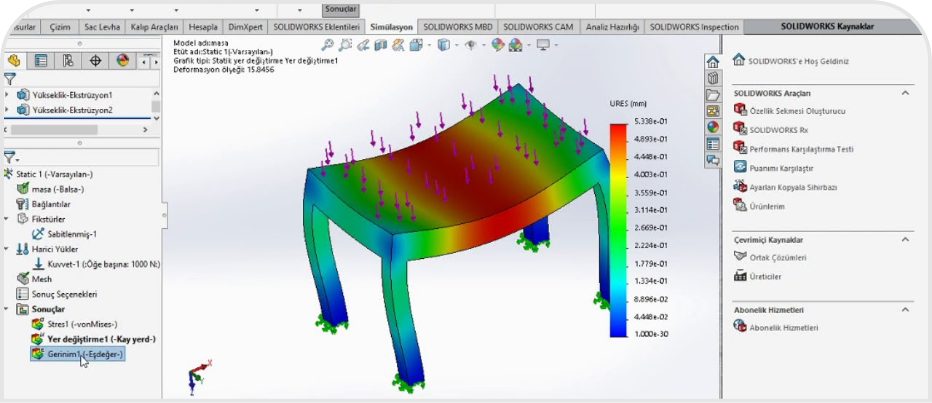
Simulation Standard covers linear static analysis of parts and assemblies, time-based motion analysis and fatigue (life) analysis. Static studies show the deformed shape and whether the design is safe; motion studies plot position, velocity, acceleration, reaction forces and torque over time, and the forces found can be transferred to a static study. Convergence studies, stress concentration checks and singularity detection help you judge how far you can trust the results. You can model assembly connections with bolt, pin and spring connectors, and use Trend Tracker to follow how design changes affect the results. Direction-dependent (orthotropic) material properties can be defined for wood and board materials.
- Deflection of a bookcase or cabinet shelf under load; choosing shelf thickness and pin spacing
- Static strength of table, coffee table and chair frames, and the forces at their joints
- Stress and factor of safety in brackets, arms and connecting parts
- Fatigue life of doors and mechanisms that open and close many times
Simulation Professional
Vibration, buckling, thermal, drop test and optimization
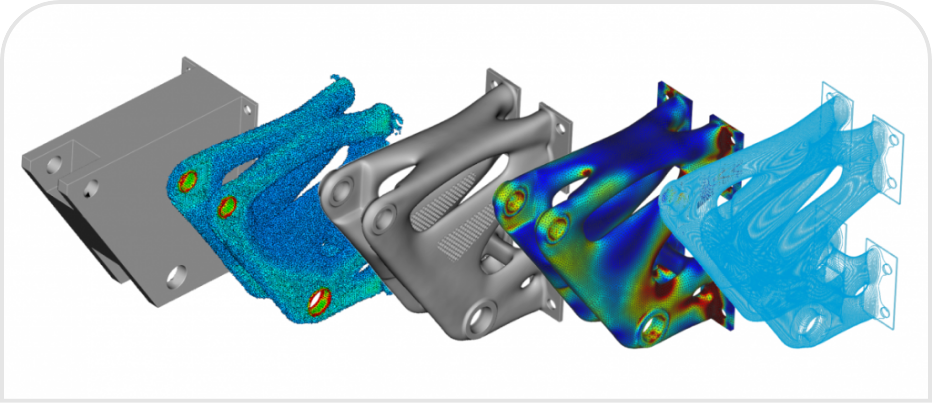
Simulation Professional adds frequency and buckling analysis, thermal analysis, drop tests, pressure vessel analysis, topology studies and design studies to everything in Standard. A design study solves every variation within the dimension ranges you set and finds the lightest design that is still strong enough; a topology study redistributes material within the allowed volume and proposes a lightweight starting shape. Submodeling lets you re-solve just the critical region of a large assembly, 2D simplification speeds up suitable models, and the Load Case Manager evaluates load combinations in a single study. Event-based motion analysis, defined with sensors and actuators, calculates duty cycle times for automated systems.
- Comparing a machine frame’s natural frequencies with motor and fan speeds to avoid resonance
- Buckling loads in thin-walled profiles, uprights and legs
- Impact stresses when a packaged product is dropped
- Reducing material in brackets and connecting parts with topology studies
Simulation Premium
Nonlinear and dynamic analysis
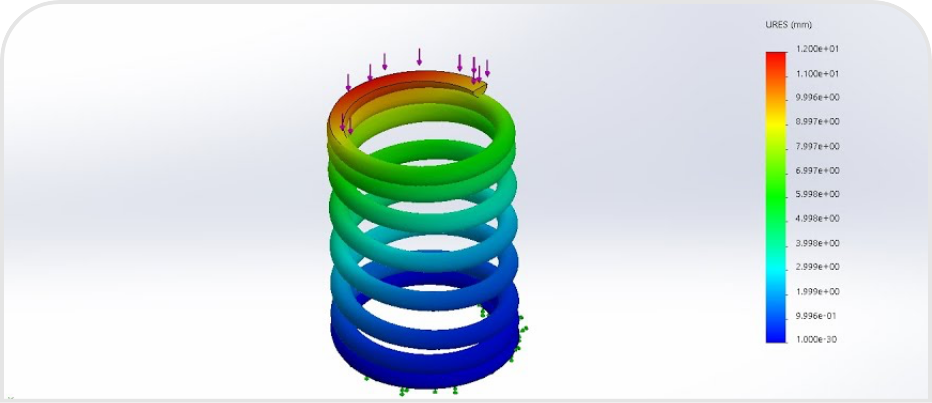
Simulation Premium handles large deformations, permanent set beyond yield, nonlinear materials such as rubber and plastics, and contact and boundary conditions that change under load. Linear dynamic studies (modal time history, harmonic, random vibration and response spectrum) are also part of this package; response spectrum analysis is used to assess shock loads such as earthquakes. For layered composites, the thickness and material of each ply can be defined and the structure checked against different failure criteria.
- Insertion force and permanent deformation of plastic clips, snap fits and latches
- Joint strength around screws, dowels and fasteners under loads beyond yield
- Harmonic and random vibration response of machine parts in vibrating environments
- Large displacements in spring mechanisms, seals and flexible parts

SOLIDWORKS Flow Simulation
Fluid flow and heat transfer (CFD)
Flow Simulation is a computational fluid dynamics (CFD) solution that calculates liquid and gas flow, heat transfer and fluid forces on the SOLIDWORKS model. Because it is embedded in SOLIDWORKS, there is no import or export and no geometry is lost; you do not need to extract the wetted volume by hand, the mesh for fluid and solid regions is created automatically, and design revisions carry through to the study. Laminar, transitional and turbulent flow are solved automatically in the same model, time steps adjust themselves to avoid convergence problems, and parametric optimization tries design changes automatically against a goal you set. Internal flow (pipes, valves, ducts, enclosures) and external flow (air around a product) can both be set up, and for a quick flow check FloXpress is included in every SOLIDWORKS package.
Added on top of a Flow Simulation license, the HVAC module accounts for occupant comfort, solar radiation and radiation through transparent bodies such as glass, while the Electronic Cooling module covers multilayer PCBs, heat pipes, thermal pads, JEDEC component models and Joule heating.
- Fan selection and hot spots in electronics enclosures and control cabinets
- Pressure drop in valves and manifolds
- Heat build-up in furniture and display units with LED lighting
- Air distribution in ventilation ducts

SOLIDWORKS Plastics
See injection molding before the mold is made
SOLIDWORKS Plastics simulates how a plastic part fills in the mold: fill time, pressure and temperature distribution, air traps, weld lines and the risk of short shots are visible while the part is still being designed. It runs directly inside SOLIDWORKS and does not require plastics expertise; an intuitive interface guides you through the setup step by step, advanced meshing handles thin- and thick-walled models, and the material database of commercial polymers can be customized. Plastics Standard offers fill analysis for part designers; Professional adds multi-cavity and family molds, packing and runner balancing for mold designers; Premium adds cooling line and warpage analysis. Getting the gate location and wall thickness right early means fewer mold revisions.
- Furniture and hardware: plastic handles, feet, connectors and drawer accessories
- Machinery and devices: covers, guards and housings
For product details, see Flow Simulation and Plastics in the product family.

Design · Sales · Production
SOLIDWORKS Simulation Demo & Information Request
Let’s look at your own models together and work out which analysis package fits your work. Send us your request and we will prepare demo, licensing and training options for you.