SOLIDWORKS PRODUCT FAMILY

Explore the SOLIDWORKS Product Family

Connected solutions for design, analysis, data management, visualization and manufacturing.

From the SOLIDWORKS 3D CAD packages to Simulation, PDM, Manage, Electrical, Visualize, Composer, CAM, Inspection and MBD, every product works on the same SOLIDWORKS data. Mechanical design, electrical design, design validation and technical documentation move forward in parallel instead of waiting on each other, with project and data management tying them together. Start with what you need and add more as your processes grow; MAGEN helps you put the right setup together.

Exploded red clutch assembly surrounded by SOLIDWORKS toolbars
Two people working together on a tablet

Keep your subscription current: get new releases and uninterrupted technical support.

Subscription covers new releases and the service packs published during the year, installation and activation support, help with technical issues, and reporting and follow-up of bugs and enhancement requests with the developer. With an active subscription, every SOLIDWORKS 3D CAD license gets access to SOLIDWORKS CAM Standard, and Professional and Premium licenses also include SOLIDWORKS Visualize Standard.

Subscription and Renewal

3D DESIGN

SOLIDWORKS 3D CAD: Standard, Professional, Premium

SOLIDWORKS 3D CAD comes in three packages, each including everything in the one before. Standard covers parts, assemblies and 2D drawings together with sheet metal, weldments, surfacing and mold tools. Professional adds data management, photorealistic rendering, a standard parts library and cost estimation, and Premium adds structural and motion analysis, design validation, and piping and cable routing.

Explore SOLIDWORKS 3D CAD
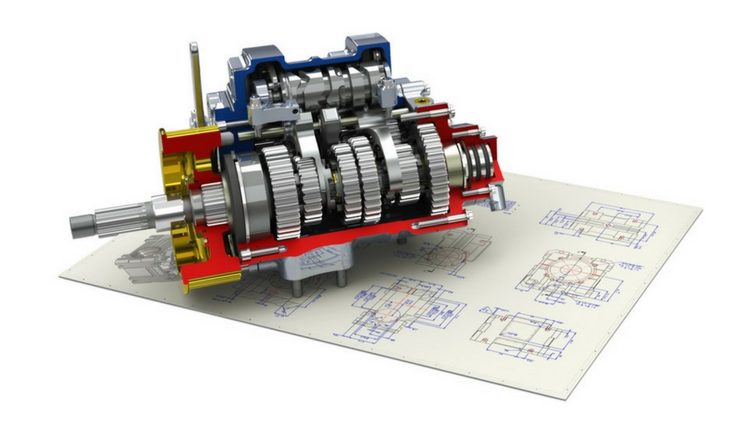
Cutaway gearbox model on top of engineering drawing sheets
Exploded view of a pump assembly

SOLIDWORKS Standard

  • Parts, assemblies and 2D drawings that update with the model
  • Sheet metal, weldments, surfacing and mold tools
  • Configurations, the Design Library and rule-based design automation with DriveWorksXpress
  • Interference, collision and hole alignment checks; assembly animation
  • Bills of materials, cut lists, and automatic hole and weld tables
  • Opening other CAD formats with 3D Interconnect, DXF/DWG import and export; early checks with SimulationXpress and FloXpress
Engine mechanism assembly

SOLIDWORKS Professional

  • Everything in Standard
  • Toolbox library of standard parts and fasteners
  • Part cost estimation with Costing
  • Drawing standards checks with Design Checker; batch jobs with Task Scheduler
  • File management with PDM Standard; Visualize Standard with an active subscription
  • eDrawings Professional, ScanTo3D, TolAnalyst and CircuitWorks
Red sports car model shown half transparent

SOLIDWORKS Premium

  • Everything in Professional
  • Structural (linear static) analysis of parts and assemblies
  • Motion and force analysis with Motion
  • Pipe, tube and electrical harness routing with Routing
  • Assembly costing and environmental impact assessment with Sustainability
  • Advanced surface flattening; CATIA V5 data through 3D Interconnect
Package comparison (summary)
CapabilityStandardProfessionalPremium
Parts, assemblies and drawings✓✓✓
Sheet metal, weldments, surfacing, mold tools✓✓✓
Configurations, Design Library, DriveWorksXpress✓✓✓
Basic analysis (SimulationXpress, FloXpress, DFMXpress)✓✓✓
Toolbox, Costing (parts), Design Checker–✓✓
Task Scheduler, ScanTo3D, TolAnalyst–✓✓
PDM Standard, eDrawings Professional–✓✓
Visualize Standard (with active subscription)–✓✓
Structural analysis (Simulation)––✓
Motion analysis (Motion)––✓
Pipe, tube and cable routing (Routing)––✓
Assembly costing, Sustainability––✓

Package contents can change between releases; we confirm the current scope with you when preparing your quote.

SIMULATION AND ANALYSIS

SOLIDWORKS Simulation

SOLIDWORKS Simulation is a finite element analysis (FEA) solution that runs inside the SOLIDWORKS interface. Testing your product virtually lets you answer “what if?” questions without building a prototype and catch problems that would otherwise surface in production. Meshing is automatic, result reports are generated for you, and every design change carries through to the study. Simulation is a separate license that runs on a SOLIDWORKS license; it can also be used with network licensing, and packages can be upgraded later.

Explore SOLIDWORKS Simulation
Stress analysis results of a bicycle frame on a laptop

Simulation Standard

  • Linear static analysis of parts and assemblies
  • Time-based motion analysis: position, velocity, acceleration, reaction force and torque plots
  • Fatigue and life calculation under repeated loads
  • Convergence studies, stress concentration and singularity detection
  • Tracking the effect of design changes with Trend Tracker

Simulation Professional

  • Everything in Standard
  • Frequency (natural vibration), buckling and thermal analysis
  • Drop tests and pressure vessel analysis
  • Design studies (parametric optimization) and topology studies
  • Submodeling, 2D simplification and the Load Case Manager
  • Event-based motion analysis with sensors and actuators

Simulation Premium

  • Everything in Professional
  • Nonlinear analysis: large deformation, permanent set, changing contact and boundary conditions
  • Linear dynamics: modal time history, harmonic and random vibration
  • Response spectrum analysis (seismic and shock loads)
  • Layer-by-layer thickness and material definition for composite structures

FLOW AND THERMAL ANALYSIS

SOLIDWORKS Flow Simulation

Flow Simulation brings computational fluid dynamics (CFD) into SOLIDWORKS. Because it is embedded in SOLIDWORKS, there is no import or export and no geometry is lost; you do not have to build the fluid volume by hand, and the mesh for fluid and solid regions is created automatically. Laminar, transitional and turbulent flow are handled automatically in the same model, so you can test everything from valves and fans to electronics enclosures and ventilation ducts virtually.

Flow lines and velocity scale around a cylindrical body

Flow Simulation

  • Internal and external flow: pipes, valves, ducts and flow around bodies
  • Heat transfer by conduction, convection and radiation
  • Rotating components (fans, impellers) and compressible gas flow
  • Visualization of pressure, velocity and temperature distribution
  • Parametric studies and goal-driven design optimization

HVAC Module

  • Assessing occupant comfort in terms of airflow and temperature
  • Solar radiation effects; advanced radiation through transparent bodies such as glass
  • Extended database of building materials and fans
  • Added on top of a Flow Simulation license

Electronic Cooling Module

  • Developing the cooling strategy for boards and enclosures alongside the design
  • Multilayer PCB, heat pipe, thermal pad, two-resistor and JEDEC component models
  • Joule heating and an extensive electronic component library
  • Added on top of a Flow Simulation license

INJECTION MOLDING ANALYSIS

SOLIDWORKS Plastics

SOLIDWORKS Plastics simulates how molten plastic flows in the mold during injection, revealing manufacturing defects in parts and molds before production. It does not require plastics expertise: an intuitive interface guides you through the setup step by step, and the material database of commercial polymers can be customized. You spot risks such as short shots, weld lines and sink marks while still designing, and cut down on mold rework.

Injection fill analysis result of a plastic part

Plastics Standard

  • Fill analysis for part designers
  • Prediction of short shots, weld lines, air traps and sink marks
  • Evaluating the injection location
  • Sharing results as eDrawings files

Plastics Professional

  • Everything in Standard
  • Single-cavity, multi-cavity and family mold analysis for mold designers
  • Runner and gate design, runner balancing
  • Packing analysis and cycle time estimation

Plastics Premium

  • Everything in Professional
  • Cooling line analysis: conformal channels, baffles and bubblers
  • Warpage prediction
  • Comparing how material and process settings affect warpage

DATA MANAGEMENT

SOLIDWORKS PDM

SOLIDWORKS PDM stores design data in a central vault and keeps track of who is working on which file, revision history and approval processes. “File not found” errors, duplicate parts, outdated production files and revision confusion become a thing of the past: production always works from the latest data approved by the design team. Office documents, PDFs and every other file type are managed in the same system alongside CAD files.

Explore SOLIDWORKS PDM
Illustration of two people organizing files and folders on a central board

PDM Standard

  • For small and mid-sized design teams at a single site
  • File vault, check-in/check-out and version history
  • Approval workflows and revision schemes
  • Runs on the free Microsoft SQL Server Express
  • Included with SOLIDWORKS Professional and Premium

PDM Professional

  • For larger, distributed teams and multi-site work
  • Advanced workflows, automatic numbering and notifications
  • Replication between sites and web access
  • Microsoft SQL Server Standard; customization through the API and ERP integration
  • Viewer licenses for users who only need to view

PDM Implementation with MAGEN

  • Vault structure, folder and data card design
  • Workflows, revision scheme and permissions
  • Migration of existing data with reference checks, and user training
  • Our PDM implementation service

PROJECTS, PROCESSES AND BOMS

SOLIDWORKS Manage

SOLIDWORKS Manage is a lean PLM solution built on PDM Professional. Beyond design files, it brings projects, engineering change processes and bills of materials together in one system, and because it needs less infrastructure and consulting than traditional PLM, it is quicker to put into service. The Manage add-in works inside PDM and SOLIDWORKS, so you can see which projects, tasks or processes use a file without leaving the interface. PDM Professional licenses can be upgraded to Manage, and users who do not need Manage features can stay on PDM licenses.

Team working with project dashboards and 3D models on screens

Project Management

  • Gantt charts, milestones, tasks and resources
  • Capacity management: who has how much work and when
  • Linking project deliverables to files and products

Process Management

  • Engineering change request and order (ECR/ECO) processes
  • Rule-based approval steps, e-mail notifications and reminders
  • Dashboards and automatic reports in your Office templates

Item and BOM Management

  • BOMs that include items without drawings, such as electrical components and packaging
  • BOM variants, version comparison and reporting
  • An API for exchanging data with ERP and other systems

ELECTRICAL DESIGN

SOLIDWORKS Electrical

SOLIDWORKS Electrical links 2D electrical schematics and 3D mechanical design in both directions. On cabinet, machine and harness projects, electrical and mechanical teams work on the same data: schematic changes appear in the 3D model, and cable lengths calculated in 3D flow back to the schematic. The schematic applications run independently of SOLIDWORKS, while Electrical 3D is an add-in inside SOLIDWORKS, so each department works in its own environment on the same project.

Wired electrical cabinet shown as a transparent drawing

Electrical Schematic

  • Single-line, multi-line and mixed schematics
  • Symbol and manufacturer part libraries, extendable from the Electrical Content Portal
  • Automatic wire numbering, terminal and bill of materials reports
  • PLC definition, connectors and harnesses in the Professional edition
  • Importing schematics and symbols in DWG format

Electrical 3D

  • Placing schematic components in the 3D cabinet assembly
  • Automatic routing of wires, cables and harnesses in 3D
  • Calculating cable lengths and duct fill ratios and sending them back to the schematic
  • Harness drawings with bills of materials and balloons

Electrical Professional

  • Electrical Schematic Professional and Electrical 3D in one
  • A single package for electrical and mechanical teams
  • Projects kept in a SQL Server database with real-time sharing
  • Multilingual interface and project documents, Turkish included

VISUALIZATION

SOLIDWORKS Visualize

SOLIDWORKS Visualize is a standalone application that turns CAD data into photorealistic images, animations and interactive content. Its simple interface lets even non-technical users produce striking visuals quickly, so catalog, website and presentation content can be ready while the design is still in progress, without waiting for a physical prototype or a photo shoot. It runs on computers without SOLIDWORKS installed and opens files from many other systems such as Rhino, Alias and 3ds Max.

Photorealistic render of a clutch and engine cover

Visualize Standard

  • Import of SOLIDWORKS and other CAD data
  • Ready-made material, appearance and environment libraries
  • Photorealistic still images
  • Included with SOLIDWORKS Professional and Premium on active subscription

Visualize Professional

  • Everything in Standard
  • Camera, part and turntable animations with motion blur
  • 360° panoramas, virtual reality (VR) and interactive output
  • Configurations that show product options, and a render queue

Visualize with MAGEN

  • Visualize training: materials, lighting, cameras and animation
  • Choosing the right workstation and graphics card for GPU rendering
  • See our training

TECHNICAL DOCUMENTATION

SOLIDWORKS Composer

SOLIDWORKS Composer, a Dassault Systèmes product, creates technical illustrations, assembly instructions, maintenance manuals, product catalogs and interactive 3D content from 3D CAD data. Alongside SOLIDWORKS models it opens formats such as STEP, IGES and STL, and you can share the content you create as PDF, HTML, SVG and video. When the design changes, you refresh your documents from the updated model instead of starting over.

Explore SOLIDWORKS Composer
Exploded view of a red robot arm assembly

Composer

  • Exploded views and technical illustrations
  • Step-by-step assembly and maintenance instructions
  • Animations that explain how a product works
  • Parts lists and balloon numbering

Sharing and Publishing

  • Vector drawings, images and video output
  • Interactive 3D content and training material
  • Viewing content with Composer Player
  • A shared resource for production, sales, service and training teams

Composer with MAGEN

  • Composer training: preparing projects, views, animation and publishing
  • Hands-on practice with your own assemblies
  • See our training

CNC PROGRAMMING

SOLIDWORKS CAM

SOLIDWORKS CAM is a CNC programming solution that runs inside SOLIDWORKS. Toolpaths are created directly from the design model; automatic feature recognition and the rules in the technology database suggest machining operations, and when the model changes you update the machining program with it. SOLIDWORKS licenses on active subscription include access to SOLIDWORKS CAM Standard. For more advanced machining strategies, multi-axis and mill-turn machines, we offer SolidCAM, which is fully integrated into SOLIDWORKS.

Explore SolidCAM
Mold block with a toolpath and cutting tool

CAM Standard

  • 2.5-axis milling and hole-making operations
  • Automatic feature recognition and rule-based machining (technology database)
  • Toolpath simulation and post-processed output

CAM Professional

  • Everything in Standard
  • 3-axis high-speed milling and 4/5-axis indexed machining
  • Turning: OD and ID, grooving and threading
  • Machining in the assembly environment, together with fixtures

SolidCAM for Advanced Machining

  • iMachining, HSM and HSS; indexed and simultaneous 4/5-axis
  • Mill-Turn, Swiss-Type and Solid Probe modules
  • Sales, installation, training and technical support from MAGEN
  • Explore SolidCAM · For wood panel machining, SWOOD CAM

QUALITY CONTROL

SOLIDWORKS Inspection

SOLIDWORKS Inspection automates the creation of ballooned inspection drawings and inspection reports in formats such as AS9102 and PPAP from 2D and 3D data. It cuts the time spent on manual ballooning and tables and prevents data entry errors, so quality control moves faster and defects and scrap go down. It works as an add-in inside SOLIDWORKS or as a standalone application that does not need SOLIDWORKS, and it can compare revisions of a drawing to show which dimensions changed.

Ballooned drawing and characteristics list in SOLIDWORKS Inspection

Inspection Standard

  • Automatic ballooning of SOLIDWORKS drawings in a few clicks
  • PDF, TIFF, DXF and DWG drawings in the standalone application; OCR to read characteristics from PDF and TIFF
  • Reports with AS9102, PPAP or your own Excel templates
  • Export of ballooned drawings to PDF and data to CSV or XML

Inspection Professional

  • Everything in Standard
  • Working with 3D SOLIDWORKS models and NX, CATIA V5 and Creo files
  • Import of CMM measurement results (PC-DMIS, Calypso and others)
  • Entering measurements manually or from digital gauges, with pass/fail evaluation

MODEL-BASED DEFINITION

SOLIDWORKS MBD

SOLIDWORKS MBD defines dimensions, tolerances and manufacturing information (PMI) directly on the 3D model and publishes it as 3D PDF, eDrawings and STEP 242. It reduces the work of preparing and maintaining 2D drawings and avoids the misreadings that come from flattening complex parts into two dimensions. Production teams and suppliers without SOLIDWORKS can see the information as well.

Flange with dimensions and geometric tolerances shown on the 3D model

3D Product and Manufacturing Information

  • Dimensions, datums, geometric tolerances, surface finish and notes
  • Defining dimensions and tolerances with DimXpert
  • Saved 3D views including section, broken-out and exploded views; configurations

Publishing and Sharing

  • Technical data packages with 3D PDF templates
  • 3D PDF Template Editor for logos, custom properties and BOM areas
  • Export with 3D product information through eDrawings and STEP AP242
  • Switching views, rotating, measuring and sectioning inside the 3D PDF

Who Is It For?

  • Design teams that want to reduce drawing workload
  • Companies that work with their supply chain through 3D data
  • Production that uses the model as the reference for machining and measurement

CLOUD PLATFORM

The 3DEXPERIENCE Platform

Dassault Systèmes’ 3DEXPERIENCE platform combines SOLIDWORKS with cloud-based data management, collaboration and browser-based applications. You store data securely and track revisions without setting up servers or extra software, and your customers and suppliers can view designs and give feedback from any device, even a phone, without needing SOLIDWORKS. The platform grows with you, from small teams to large organizations.

Explore 3DEXPERIENCE
The same 3D design open on a desktop, laptop, tablet and phone

Cloud Data Management

  • Secure data storage in the cloud, with no server to set up
  • Revision, approval and lifecycle management
  • Saving to the platform directly from SOLIDWORKS

Collaboration

  • Project spaces, tasks and discussions
  • Viewing and marking up models in the browser and on mobile devices
  • Controlled sharing with stakeholders, as far as you allow

Browser-Based Design

  • 3D design applications that run in the browser
  • Access from different devices without installation
  • Works alongside desktop SOLIDWORKS

Complete SOLIDWORKS with MAGEN Solutions

SolidCAM

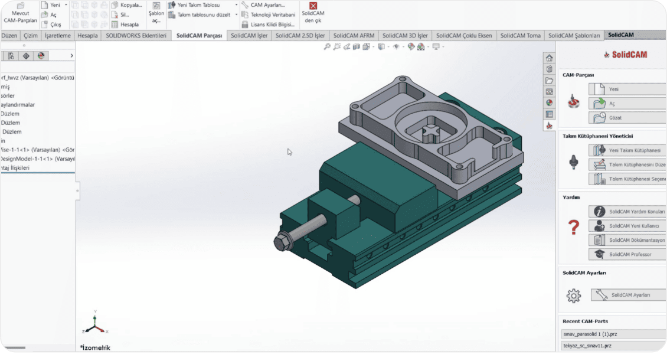
CAM fully integrated into SOLIDWORKS: CNC programming from 2.5-axis to simultaneous 5-axis and from mill-turn to Swiss-type, on the same model and in the same interface, with iMachining technology. MAGEN provides SolidCAM sales, installation, training and technical support. Explore SolidCAM

SolidCAM menus and a part to be machined inside the SOLIDWORKS interface

SWOOD

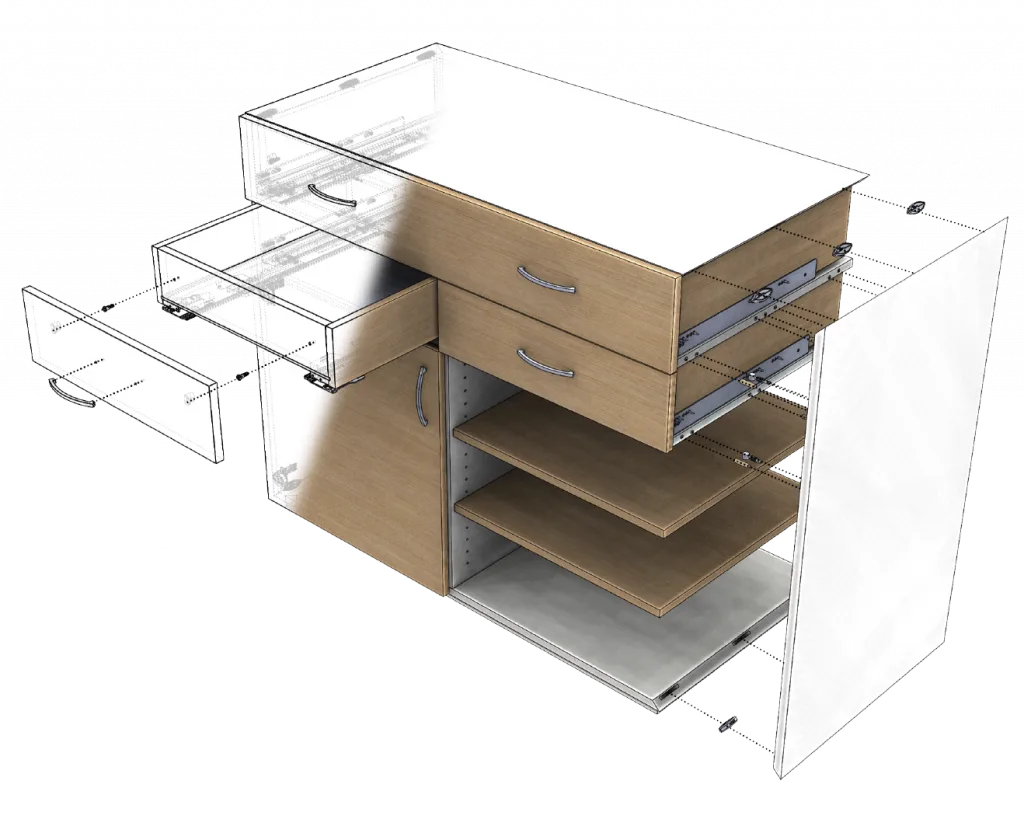
Furniture design, cut lists, CNC and nesting inside SOLIDWORKS. MAGEN provides SWOOD sales, installation, training and consulting, and connects SWOOD costs to MAGEN Planner pricing. Explore SWOOD

Exploded view of a drawer cabinet designed in SOLIDWORKS

MAGEN Planner

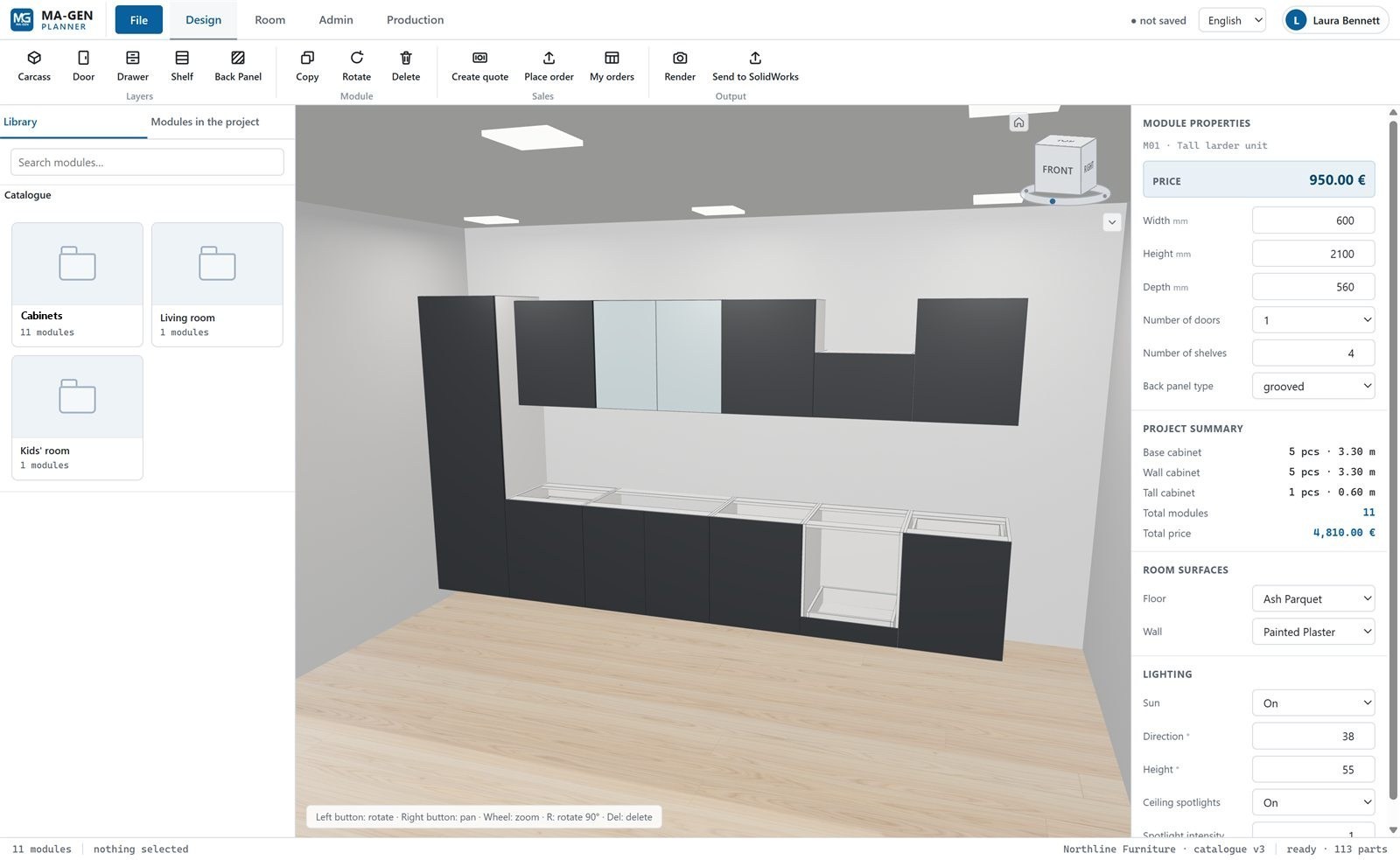
A 3D configurator, quoting and ordering built on a catalog that comes from SOLIDWORKS. Your customers configure products on your website, your sales team sends quotes, and approved orders go back to SOLIDWORKS with their dimensions. Explore MAGEN Planner

MAGEN Planner design screen: module properties, price and project summary
MAGEN logo
MAGEN

Authorized SOLIDWORKS Reseller

SOLIDWORKS Product Family Demo and Information Request

Let’s work out together which SOLIDWORKS products fit your workflow. Send us your request and we will prepare demo, licensing and training recommendations for you.

Quote & Information Form