

Cimatron Mold
Injection Mold Design and Manufacturing
From opening direction and parting lines to the mold base, cooling and ejection system, and on to CNC programming, prepare the complete injection mold in a single interface.
Overview
One interface from quotation to production
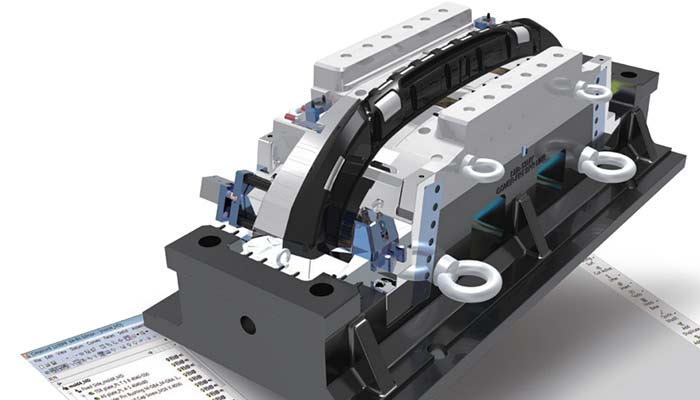
Cimatron Mold is an integrated CAD/CAM solution for designing and manufacturing injection molds of any size and complexity. Its toolmaking-specific modeling and design tools bring the whole process together in one environment, from reviewing the customer’s part to completing the mold base and machining the mold components.
Besides standard formats such as DXF, IGES, STEP, VDA, Parasolid and SAT, it works with data from AutoCAD, Inventor, CATIA, Creo, NX, SOLIDWORKS and Solid Edge, and converts mesh files such as STL, OBJ, PLY, 3MF and JT with color and texture. Incomplete or unstitched surfaces are repaired with hybrid CAD tools, so work can start without delay.
Parting · QuickSplit
Split core, cavity and slides quickly
Create parting lines for the core, cavity and slides on the model quickly and practically. Use direction analysis to find the right opening direction and parting line, even on the most challenging parts.
- Analyze undercuts, draft angles and wall thickness, and validate parting surfaces.
- Create core, cavity and slider components automatically, kept associative with the parting work.
- Prepare early 3D layouts for multi-cavity and family molds and submit them for approval.

Mold Base Design
Build the mold base and its components in minutes
Load the mold base from standard supplier catalogs or from your own templates, and plates and fasteners are arranged to the project’s dimensions. Place ejectors, runners, cooling, slides, lifters and inserts with dedicated tools.
- Design the runner system from a 2D sketch or directly in 3D, and add the sprue bushing.
- Place ejectors in bulk and let the plate pockets be created automatically.
- Analyze mold motion and catch collisions during design.
- Use engineering change (ECO) tools to bring changed part geometry into the design at any stage.
- Generate a bill of materials report for all mold components.


Cooling · Conformal Cooling
Cooling channels that shorten cycle times
Lay out cooling channels together with plugs, connectors and baffles, and get a warning when a channel interferes with another mold component. Design conformal cooling channels that follow the part shape using mesh, surface, solid and wireframe tools to reduce injection cycle times.
For inserts produced by additive manufacturing (3D printing), post-print machining allowances, fixtures and milling, drilling and EDM operations are prepared in the same environment.
Catalog Parts and Drawings
Correctly sized parts, ready-made drawings
Use catalog parts with up-to-date dimensions or build a parts library of your own; parts are applied automatically to the main assembly or sub-assemblies.
- Create drawing templates for your company or your customers and reuse them.
- Add bills of materials and hole tables, with centerlines created automatically for circles and arcs.
- Generate all views of a part in one go with the multi-view and section tools.


CAD-AI and CNC Programming
A seamless path from design to the machine
AI-assisted feature recognition detects features on the solid model and color-codes them by type, speeding up mold design and production planning.
Finished mold components move straight on to CNC programming in the same environment: 2.5- to 5-axis milling, automated drilling, plate machining, 2- and 4-axis wire EDM, machine simulation and post-processor support. See the Cimatron Electrode and Cimatron Mill-Turn and NC pages for details.
Video
See Cimatron Mold in action
Mold splitting with QuickSplit, from the Mold Design tutorial series on Cimatron’s official channel. Request a demo to evaluate Cimatron Mold against your own workflow.
Request a Demo